Body worn live streaming
AXIS Body Worn Live streams real-time video and audio from body worn cameras to remote operators over Wi-Fi or mobile networks. It gives command centers live situational awareness while events unfold, rather than waiting for cameras to dock and offload recordings.
This page explains the hosting options and the integration paths for viewing live video. For full setup detail, network configuration, and the exhaustive endpoint and port lists, see the AXIS Body Worn Live Axis-hosted user manual and the AXIS Body Worn Live Self-hosted user manual.
Why this matters for integrators
Traditional body worn systems (BWS) are store-and-forward: video stays on the camera until it's physically docked. AXIS Body Worn Live adds a parallel real-time path. Camera wearers can initiate a live stream in the field. Remote operators can also initiate streams when remote activation is enabled in the camera profile. Security operations centers can watch streams as they happen.
For VMS and monitoring application integrators, the self-hosted option provides the AXIS Body Worn Live Self-hosted SDK. Use the SDK to connect your application to the self-hosted server, receive stream, remote activation, and location events, and retrieve active video. The Axis-hosted option delivers end-to-end encrypted streams through Axis cloud infrastructure with a web client that can be embedded in your platform.
Two hosting options
| Axis-hosted | Self-hosted | |
|---|---|---|
| Infrastructure | Axis cloud | Your own on-premises server device |
| Streaming protocol | Cloud-relayed, end-to-end encrypted | WebRTC peer-to-peer (encrypted) |
| Viewing client | Web client at live.bw.mysystems.axis.com | VMS integration, embedded web client, or browser |
| User management | My Axis accounts with organization roles | Managed through the server app |
| Data residency | Multiple regions (see the Axis-hosted user manual for the current list) | Your own infrastructure |
| Internet required | Yes | Optional (can work on isolated networks with Wi-Fi) |
How streaming works
Starting a stream
A live stream can begin in four ways:
- Camera wearer initiates – double-press the function button on the camera.
- Automatic on recording – if "Live stream on record" is enabled in the camera profile, a stream starts whenever the wearer presses the recording button.
- Automatic on fall detection – if fall detection and automatic live streaming are enabled in the camera profile, a stream can start when the wearer falls.
- Remote activation – an operator starts the stream from the viewing client (requires "Remote stream activation" to be enabled in the camera profile, with mode set to "While recording" or "Always").
Starting a live stream also starts a recording if one isn't already in progress.
Self-hosted connection flow
The self-hosted option runs the AXIS Body Worn Live Self-hosted Server app on a dedicated server device. The server handles the underlying WebRTC signaling and, if needed, acts as a TURN relay. See Axis body worn for the supported server hardware.
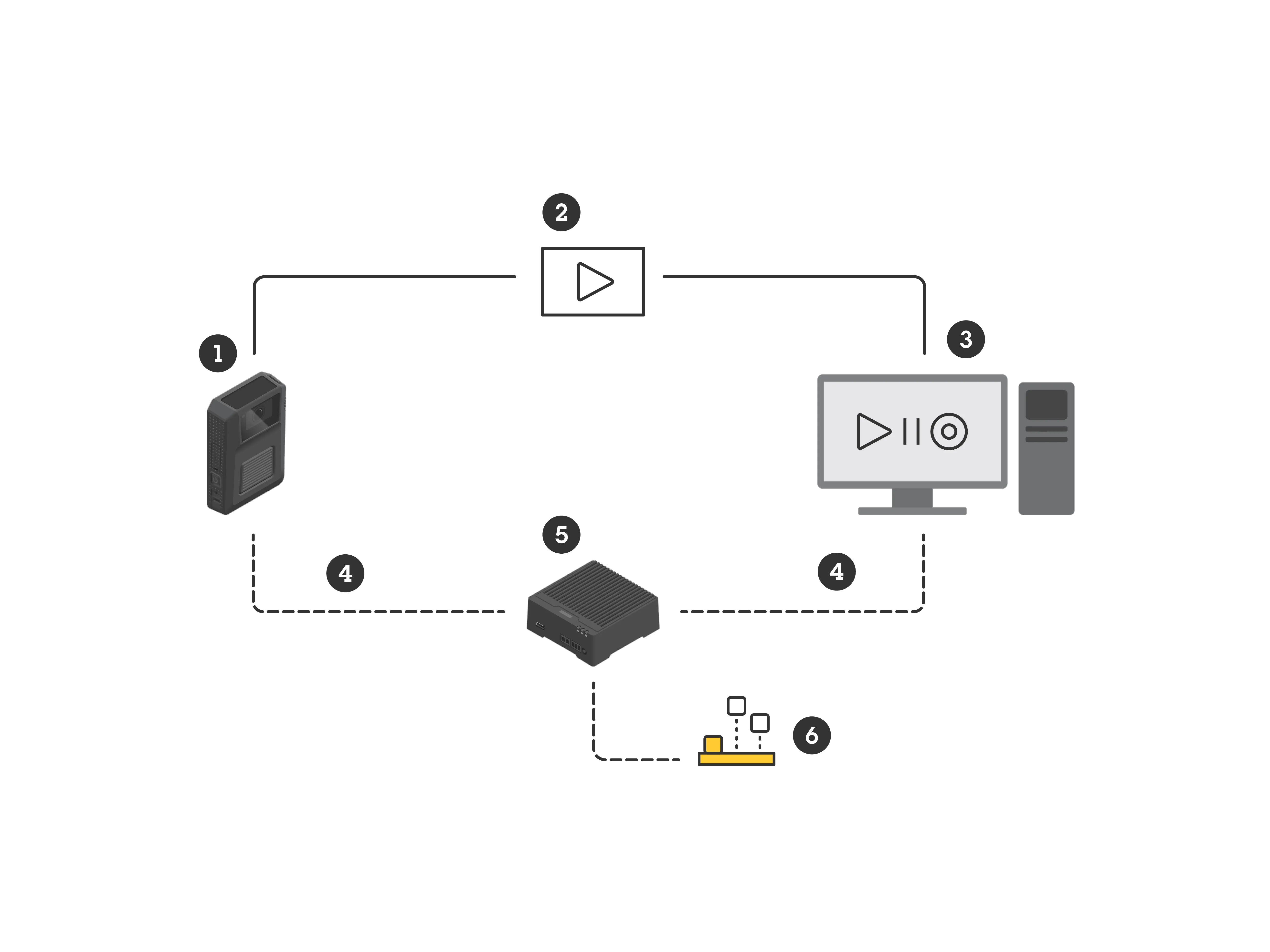
- A body worn camera connects to the AXIS Body Worn Live Self-hosted Server app when live streaming is active.
- Your application uses the SDK to connect to the server and listen for stream, remote activation, and GNSS position events.
- When the SDK reports an active stream, your application retrieves the media as a Matroska stream or raw H.264 video and AAC or Opus audio frames.
- Your application renders, processes, or records the returned media.
The SDK connector manages the supported integration with the server. The underlying media path uses encrypted WebRTC, with a TURN relay fallback when a direct peer-to-peer connection is unavailable. For firewall ports and network configuration, see the Self-hosted user manual.
Axis-hosted connection flow
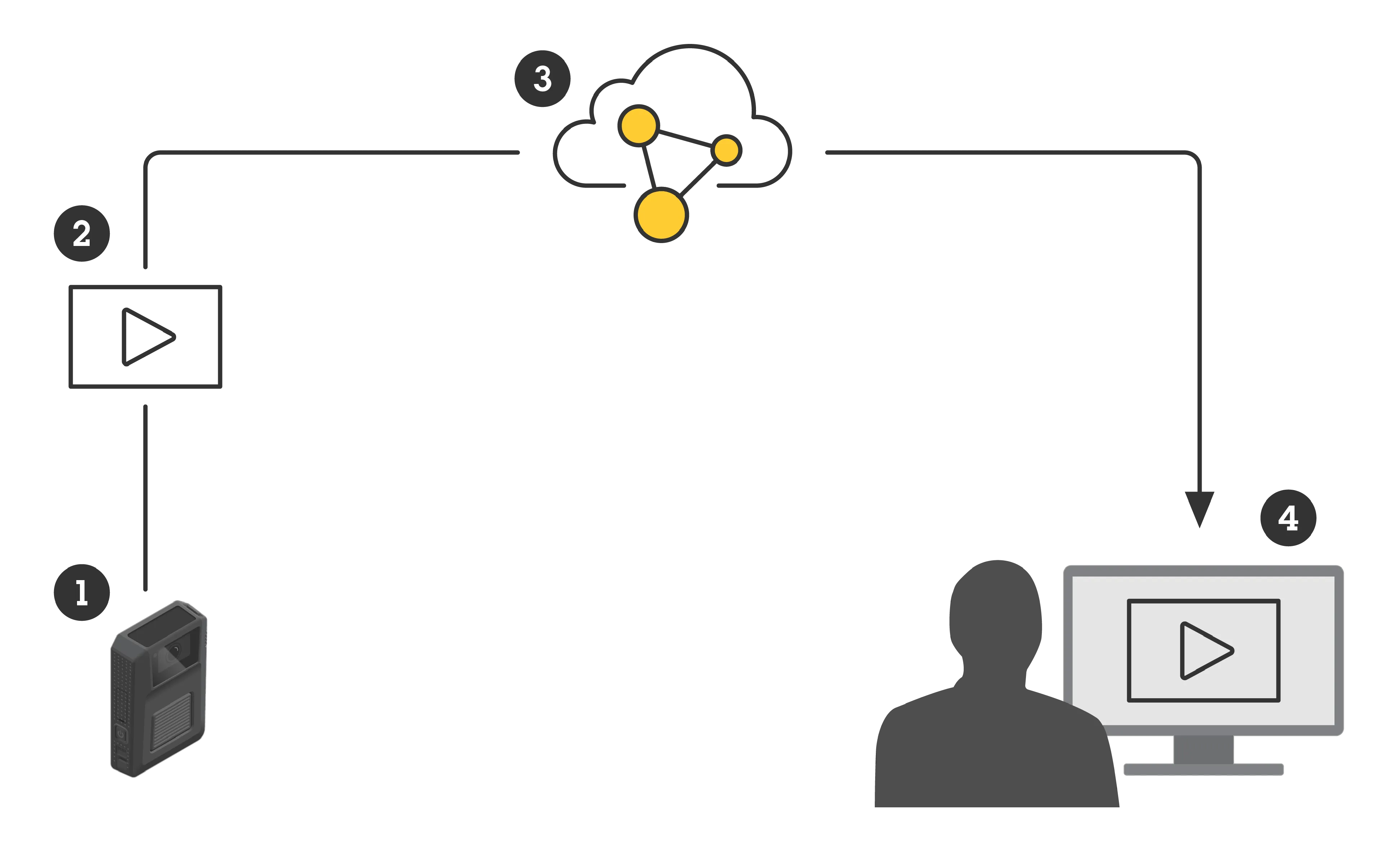
- The body worn camera connects over Wi-Fi or mobile network to Axis cloud services.
- The stream is end-to-end encrypted using a key pair generated in AXIS Body Worn Manager.
- Operators access streams through the web client, which establishes a WebSocket connection (Azure Web PubSub) for real-time application data.
- The operator's browser decrypts the stream using the private key (delivered through a secure link).
Integration points
Self-hosted: build a custom client
Use the SDK to integrate live streams into a VMS or monitoring application. The SDK provides C# and Go bindings for a connector that manages the connection to the self-hosted server. The C# package includes a 64-bit Windows connector. The Go binding uses a connector in a Docker image.
The SDK notifies your application when a wearer starts a stream, when a stream is no longer available, when a stream is available for remote activation, and when the wearer's position changes. When a stream is active, attach to it through the SDK and consume the returned Matroska stream or raw media frames.
For implementation guidance, see Integrate live video into your application.
If you only need to show video in a web tile, embed the built-in web client instead. It handles the connection and rendering, but supports only one viewing client at a time for each camera.
Axis-hosted: web client embedding
The Axis-hosted web client (live.bw.mysystems.axis.com) can be embedded in VMS platforms as a web tile or opened standalone. Operators authenticate with My Axis accounts. Three roles control access:
- Viewer – views and acknowledges live streams, views 24-hour recordings.
- Operator – same as Viewer.
- Admin – manages settings, connects BWS, invites users, and can also view streams.
Operators acknowledge streams (the camera vibrates to notify the wearer), view camera locations on a map, and play back streams from the last 24 hours.
Bandwidth and adaptive streaming
| Resolution | Peak stream bitrate per camera |
|---|---|
| 360p | up to 2.5 Mbps |
| 720p | up to 8 Mbps |
Treat these as upper thresholds rather than constant required bandwidth. For example, 720p can peak at about 8 Mbps in high-complexity scenes, while low-complexity scenes often use less. For the authoritative bandwidth values, see the Axis-hosted user manual. Plan network capacity for peak conditions; if available bandwidth drops below what the current scene requires, video quality degrades. In the self-hosted option, if the video client's reported bitrate is lower than the target, it indicates UDP packet loss in the network path. You can verify throughput with tools like iperf3.
The camera connects over:
- Wi-Fi – access points supporting IEEE 802.11k/v/r are recommended for smoother roaming between access points. Stream lag can occur when the camera transitions between access points (known limitation).
- Mobile networks (LTE) – use a SIM card for cellular connectivity. They are useful when Wi-Fi isn't available in the field.
Note: some body worn camera models support the 2.4 GHz frequency band only. Check the model's specifications on axis.com when planning Wi-Fi coverage.
Security
Encryption
Axis-hosted: End-to-end encryption is mandatory. A key pair is generated in AXIS Body Worn Manager. The public key is distributed to cameras when they dock. The private key is delivered to operators through a secure link (optionally protected with a passphrase). Only the intended recipients can decrypt and view the stream. Neither Axis nor any intermediary can access the video content.
Self-hosted: The peer-to-peer WebRTC connection is encrypted. Signaling between the camera and the server device uses certificates that are configured during setup.
Authentication and certificate renewal
For the Axis-hosted option, cameras must dock at least once every six days. The system renews certificates during docking, and live streaming stops if this interval is exceeded. This prevents compromised or lost cameras from streaming indefinitely.
Operators authenticate with individual My Axis accounts and are assigned to an organization. An operator stays signed in as long as the browser stays open. The operator is signed out if the browser closes and isn't reopened within seven days. The web client removes the decryption key if you clear browser cookies and site data, so bookmarking the link with the key avoids losing it when you clear browsing history.
For the self-hosted option, the system controller configuration file has a certificate validity period that you specify during setup. Renew it before expiration by generating a new file in AXIS Body Worn Manager.
Network security (self-hosted)
- The Live Self-hosted Server device must be reachable from a public IPv4 address (no CGNAT) for internet-connected deployments.
- DDoS mitigation is recommended if cameras connect over mobile networks from the public internet.
- Network segmentation is recommended, with the BWS in a separate segment.
- The camera connection doesn't support IEEE 802.1x, IPv6, or proxies.
Axis-hosted network access
The BWS needs outbound HTTPS on port 443 to a set of Axis cloud and Azure endpoints. For the exact allow-list of domains and endpoints to open in your firewall, see the Axis-hosted user manual.
Time synchronization
Both options require synchronized clocks between the BWS and viewing clients. The Axis-hosted option blocks streaming if clocks aren't synchronized. Use the same NTP server across the BWS and operator workstations.
Relationship to recordings and offload
AXIS Body Worn Live is an add-on to the broader body worn solution. It runs alongside the standard recording workflow rather than replacing it.
| Concern | Core BWS | AXIS Body Worn Live |
|---|---|---|
| Video capture | Records to internal camera storage | Streams in real time |
| Transfer path | Docking station → system controller → content destination | Wi-Fi/mobile → cloud or server device → viewing client |
| Timing | After the event (when camera docks) | During the event |
| Encryption | Optional for recordings | Encrypted (mandatory for Axis-hosted) |
Starting a live stream also starts a recording if recording isn't already in progress. A camera can therefore stream live while recording, and the recording later offloads through the standard docking workflow to your content destination via the body worn content destination API.
Licensing
The number of licenses is based on the average number of cameras assigned to users with a live streaming-enabled camera profile during a 24-hour period, averaged over the last week. Dedicate a camera profile for live streaming to minimize license usage.
Related resources
- Axis body worn solution – architecture of the full BWS.
- Body worn content destination API – API for building content destinations (recording offload).
- AXIS Body Worn Live Axis-hosted user manual – setup and usage guide.
- AXIS Body Worn Live Self-hosted user manual – setup and usage guide.
- Body Worn Live Self-hosted SDK – click-through agreement required before download starts.