Body worn
In the Axis body worn solution, wearable cameras capture video and audio, and the system delivers it to your software platform as secure, traceable evidence. For developers, the system exposes integration points so recordings, metadata, and live video reach a video management system (VMS) or evidence management system (EMS).
Solution overview
The Axis body worn solution is one or more body worn systems (BWS) connected to a content destination. The content destination is the third-party application that receives recordings and that you implement or integrate with. For the current hardware range, see Axis body worn.
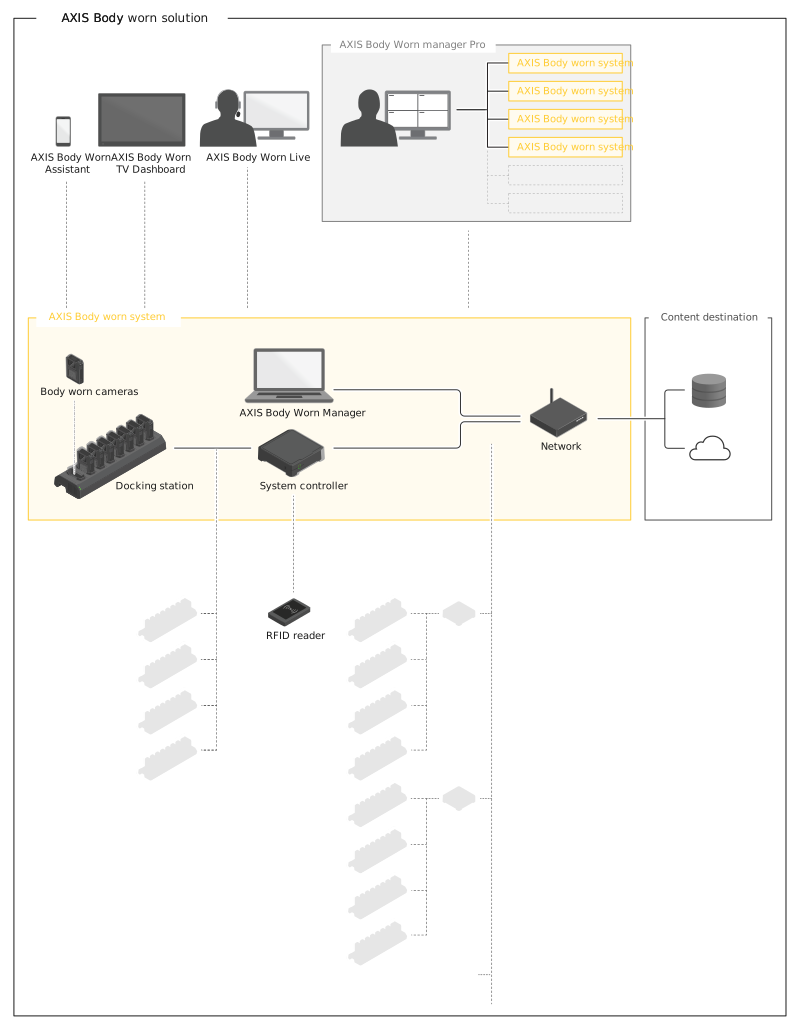
For the components, their roles, and the recording data flow, see Axis body worn solution.
What developers integrate with
Two integration surfaces support the main use cases:
- Content destination integration handles evidence transfer. Your application implements the body worn content destination API to receive recordings, metadata, and supplementary evidence data after cameras are docked.
- Live streaming integration handles real-time video. Use the AXIS Body Worn Live Self-hosted SDK to connect a VMS or monitoring application to the self-hosted server, receive stream, remote activation, and location events, and retrieve active video. For a single viewer, you can embed the built-in web client instead.
What you can build
Most integrations follow one of two patterns. The first connects a content destination, for example an EMS, to the BWS so recordings arrive automatically as evidence, with chain-of-custody metadata and, when configured, signed video and end-to-end encryption. The second streams live video and metadata directly to relevant operational clients, such as VMS or real-time crime center (RTCC) platforms, allowing operators to monitor body worn cameras and fixed cameras from a single interface.
In this section
- Getting started — run the example server and receive your first recording.
- Concepts — system architecture, content destination integration, and live streaming explained.
- How-to guides — step-by-step tasks for content destination integration.
- Reference — API endpoints, capabilities, data model, and terminology.